
AI risk is already a day-one issue for community providers. If I don’t know which tools use AI, who handles PHI, and where a person must review outputs, I leave the door open to cyber events, HIPAA gaps, billing errors, and patient harm.
Here’s the short version:
- AI is already inside daily workflows like note drafting, risk scoring, scheduling, coding, chat, and EHR add-ons.
- Smaller providers face more pressure because IT, compliance, and security teams are often lean.
- The main risks hit in four areas at once: cyber, compliance, day-to-day workflow, and patient safety.
- Vendor tools are a big part of the problem because PHI may pass through outside companies, cloud services, and model providers.
- The first step is simple: list every AI use case, every vendor, the data used, the risk level, and one person who owns review.
- Then add guardrails: approved-tool rules, minimum-data limits, human sign-off for high-risk use, logs, and AI-specific incident steps.
- A 30–90 day plan is enough to get started without adding staff.
A few numbers show why this matters. Nearly 4 in 5 U.S. hospitals use predictive models from their EHR vendor, 59% use third-party models, and about 40% of staff report shadow AI use. On top of that, 84% of ransomware attacks on rural hospitals disrupt care and business functions. When AI mistakes stack onto weak security or thin staffing, small issues can spread fast.
What I take from this is simple: I don’t need a giant AI program first. I need a clear inventory, managing third-party AI risk, human review at high-risk points, and incident plans that include AI failures.
AI & Cybersecurity Risk Mitigation In Healthcare Management
sbb-itb-535baee
What can go wrong when AI use is not governed
When AI use isn't governed, four kinds of risk hit at the same time: cybersecurity, compliance, operations, and patient safety. For smaller providers, that pileup can get out of hand fast.
4 risk areas: cybersecurity, compliance, operations, and patient safety
These failures usually land in four practical buckets.
| Risk Area | What can go wrong | Why it matters for community providers |
|---|---|---|
| Cybersecurity | PHI entered into unapproved tools; weak logging of AI agent activity; subprocessors and model providers the clinic does not directly review | Small IT teams may not know where data goes or have time to investigate [1] |
| Compliance | Unauthorized PHI disclosures; missing or incomplete BAAs; AI systems left out of HIPAA risk analyses | HIPAA responsibility stays with the covered entity even when a vendor runs the AI [9] |
| Operations | No logging of prompts or outputs; AI-dependent workflows with no manual fallback; vendor model updates that change output quality | Without an audit trail, organizations can't reconstruct what the AI did during a billing dispute or adverse event [3][5] |
| Patient safety | False summaries; automation bias; fabricated lab values, medication histories, or comorbidities | Busy clinicians may trust convincing AI output that is clinically wrong [6][8] |
Automation bias is a documented risk, and it's easy to miss in day-to-day care. In a controlled study of AI-assisted MRI diagnosis, researchers identified 8,000 clinician-AI interactions, and misleading AI outputs accounted for 45.5% of total mistakes in the AI-assisted round. [6] Another study found that clinicians with higher perceived benefit of an AI decision-support tool were much more likely to falsely agree with its outputs. [7]
False summaries make the problem worse. In one medical-summarization evaluation, a single model produced 327 medical event inconsistencies and 114 incorrect reasoning instances across just 50 summaries. [8] If a clinician copies that summary into a referral or discharge note without checking it, the error doesn't stay put. It moves with the patient.
How U.S. healthcare rules raise the stakes for AI use
HIPAA has no AI-specific carve-out. The Privacy Rule and Security Rule apply to any system that creates, receives, maintains, or transmits protected health information. [5] So if AI agents are navigating an EHR, chatbots are replying to patient messages, or ambient documentation tools are drafting notes, they face the same expectations around access control, minimum necessary use, and audit logging as human users.
Vendor relationships don't make that duty disappear. When an AI vendor processes PHI on behalf of a covered entity, a Business Associate Agreement (BAA) is required. Many AI services also rely on subcontractors - cloud hosts, model providers, or analytics partners - that a community clinic never directly reviews. That means PHI can pass through parties the clinic barely sees, sometimes without enough safeguards or clear accountability, and the covered entity still carries the compliance burden if something goes wrong. [4][5]
The first move is simple: inventory every AI-enabled tool and every vendor touching PHI.
Start with visibility: inventory AI use cases and review vendors
Once you have the inventory, review every tool and vendor that touches PHI.
Build a simple AI use-case inventory across clinical and nonclinical systems
Keep it simple: one page per use case. Pull in people from different teams and review current workflows together. Start with clinical systems, administrative systems, and vendor-backed tools.
Then ask a few plain questions:
- Does the tool make predictions?
- Does it give recommendations?
- Does it make automated decisions?
- Does it classify things on its own?
- Does it generate text?
- Does it score risk?
- Does it route tasks without human input?
Also note whether it touches PHI and whether staff can override the output.
Start with systems already in use. Then move into vendor tools. For each entry, record the workflow, the system or vendor name, the type of data used, a simple risk rating, and a named oversight owner. Use a role tied to a real person, not just a department. That keeps accountability from slipping through the cracks.
The table below shows how clinical and administrative entries can look in practice:
| Workflow | Data Used | Risk Level | Oversight Owner |
|---|---|---|---|
| Chest X-ray triage | Imaging PHI + vitals | High | Radiology Director |
| Sepsis risk alert in EHR | Labs, vitals, notes (PHI) | High | ICU Director |
| Claims denial prediction | Billing PHI, payer data | Medium | Revenue Cycle Manager |
| Staff scheduling optimization | HR and shift data, little or no PHI | Low | Operations Director |
High means the tool directly shapes a diagnosis, treatment, or triage decision. Medium means it affects revenue or operations using PHI. Low means it uses de-identified or non-PHI data and has limited downstream impact.
Use this same inventory to kick off vendor review and approval.
Add AI-specific review questions to third-party vendor reviews
Standard vendor questionnaires weren't built for AI. They often skip over things like model updates, bias testing, drift monitoring, and the cloud or model providers sitting behind the vendor.
OCR guidance summarized in the RAG makes clear that covered entities should ask vendors about AI input variables and training data, then monitor real-world performance and allow human override when AI decisions affect patient care. [10]
For lean teams, the goal is to gather evidence faster and make gaps easier to spot. AI can help collect documents and summarize issues. But final calls on the inventory, risk, and approvals should stay with people.
Once visibility is in place, move into guardrails for data use, oversight, and incident response.
Apply right-sized controls to data, decisions, and incidents
Once the inventory is done, the next step is control. That means using what you found to decide which tools are allowed, who can use them, where review needs to happen, and what your team does when something breaks. The good news: you don’t need to rebuild the whole organization to do this. In most cases, you can plug AI controls into policy, EHR, and incident workflows you already use.
Set policy guardrails and data governance rules for approved AI use
Keep an approved-tools list for any AI workflow that touches PHI. [18][20] Apply HIPAA’s minimum-necessary rule to every AI workflow. [16][17] In plain terms, each tool should get only the data it needs to do its job. A scheduling tool should get scheduling data. A billing tool should get claim fields. Nothing more. Use role-based access controls so clinicians, billers, and compliance staff each see only the PHI their AI tools need to function. [18][2]
Just as important, keep a record of what happened. Log who used the tool, what data it processed, what it returned, and whether a human accepted or overrode the output. [12][19]
Require human review at high-risk checkpoints
After data limits are in place, decide where human judgment must stay in the loop. Any point where AI can affect care, billing, or patient communication should get human review. The table below shows where review is needed, what to log, and who owns escalation.
| Checkpoint | Human Review Required | Logging Expectations | Escalation Owner |
|---|---|---|---|
| AI-generated clinical notes | Yes - licensed clinician signs off | Tool used, edits made, final version | Medical director for documentation errors |
| Diagnostic suggestions / risk scores | Yes - clinician compares against full context | Suggestion type, clinician decision, override reason | Clinical leadership for recurring issues |
| Referral / triage prioritization | Yes - clinician or triage nurse validates queue | Queue changes, cases reviewed, adjustments made | Clinical leadership if patterns repeat |
| Claims coding and billing outputs | Yes - revenue-cycle staff review each change | Codes suggested vs. accepted, payer, amount, messages sent | Billing supervisor for anomalies |
| Automated escalations (e.g., collections) | Yes - human confirms before action triggers | Account flagged, reviewer, action taken | Revenue-cycle leadership |
Use this table as a live checklist in your policy manual or intranet. Review it every quarter as new AI use cases come online.
Update incident response to cover AI failures and near misses
Next, extend your current incident plans so they also cover AI errors, hallucinations, and unsafe outputs. Fold AI failures into breach, cyber, and patient-safety workflows you already have, and add a few targeted fields. [13][11] In practice, AI incidents often show up first as an operations problem, then turn into a compliance or patient-safety issue.
When something goes wrong, start by preserving evidence. Export AI outputs, system logs, and configuration snapshots before anyone changes settings or tries a fix. Then trace every workflow the tool touches and find out whether people already acted on the output - orders placed, bills sent, messages delivered. If patient safety or data integrity is at risk, turn off the AI feature and move the affected workflow to manual processing for a period of time. [14][15]
After containment, feed the lessons back into your risk register and vendor reassessments. Add specific entries such as "AI triage misclassification" or "AI documentation hallucinations", with named owners and planned fixes. Ask vendors for updated monitoring and corrective action documentation. If they can’t close the gaps, limit the tool to lower-risk use cases until they do. Tie that review cycle to current quality, compliance, and safety meetings. [13][15]
Conclusion: A 30-90 day action roadmap for community providers
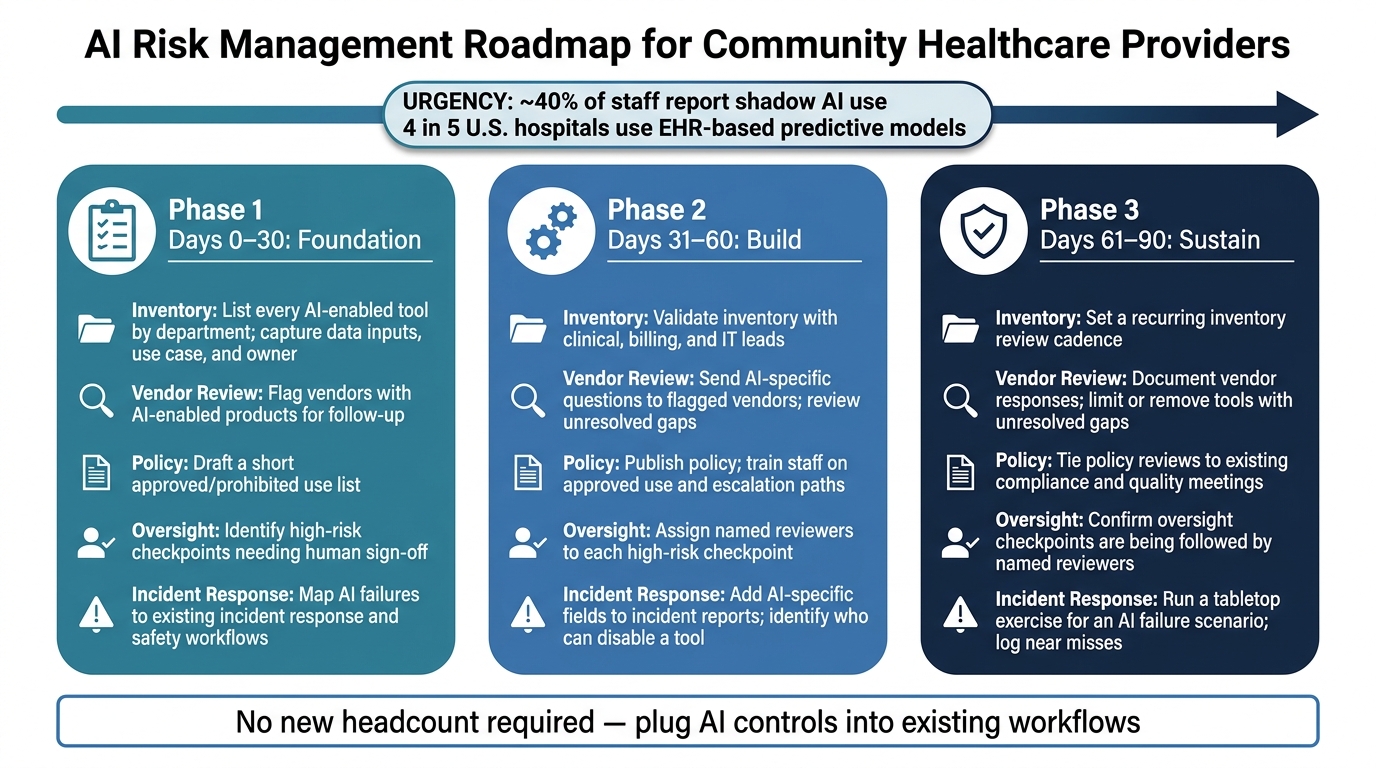
AI Risk Management Roadmap for Community Healthcare Providers: 30–90 Days
Turn those controls into a 30-90 day rollout. The roadmap below helps move your team from planning to day-to-day action.
| Phase | Inventory | Vendor Review | Policy | Oversight | Incident Response |
|---|---|---|---|---|---|
| 0–30 days | List every AI-enabled tool by department; capture data inputs, use case, and owner | Flag vendors with AI-enabled products for follow-up | Draft a short approved/prohibited use list | Identify high-risk checkpoints needing human sign-off | Map AI failures to existing incident response and safety workflows |
| 31–60 days | Validate inventory with clinical, billing, and IT leads | Send AI-specific questions to flagged vendors; review unresolved gaps | Publish policy; train staff on approved use and escalation paths | Assign named reviewers to each high-risk checkpoint | Add AI-specific fields to incident reports; identify who can disable a tool |
| 61–90 days | Set a recurring inventory review cadence | Document vendor responses and limit or remove tools with unresolved gaps | Tie policy reviews to existing compliance and quality meetings | Confirm oversight checkpoints are being followed by named reviewers | Run a tabletop exercise for an AI failure scenario; log near misses |
For small teams, this kind of central coordination matters. When inventory, vendor review, and escalation routing live in one place, it gets much easier to keep AI controls up to date without adding headcount.
FAQs
How do we find hidden AI in our workflows?
Move past one-time procurement checklists and treat this as continuous discovery.
AI often shows up inside updates to EHR, billing, and clinical communication systems. So a tool may already be in use even if no one announced it. That’s why it helps to keep an AI inventory that lists each tool, the data it touches, who owns it, and how it affects patients.
It’s also worth looking for shadow AI. In plain terms, that means tools people are using without clear review, records, or ownership. A simple cross-functional intake process can help surface them. So can reviewing workflows for unauthorized use of public tools with PHI, watching network and data flows, and checking with department leads to spot tools that don’t have clear documentation or a named owner.
What should we ask AI vendors about PHI?
Go beyond standard security questionnaires. Ask for a BAA that covers the exact workflow you plan to use. Then get specific: ask if PHI is used to train models, where the data is stored, and whether any subcontractors or third-party model hosts touch that data.
You should also ask how the vendor handles model change controls, how product or model updates are shared with customers, and what they offer for data retention, deletion, and logging. That way, PHI-related interactions can be tracked, reviewed, and managed in line with compliance needs.
Which AI tasks require human review?
Human review is mandatory for AI outputs that directly affect patient care, documentation, or payment decisions.
That covers a few major areas:
- Clinical decision support tools, such as sepsis alerts or triage systems
- Ambient documentation and note summaries before final sign-off
- AI that influences claims or revenue cycle decisions
The basic idea is simple: if an AI output can shape treatment, the medical record, or how money moves through the system, a person needs to review it before anyone acts on it.
